Console
Logging to the screen for text based applications
If your application is purely text-based, you can use the familiar
global console object to write textual data
to the screen.
nx.js renders the console output using a canvas-backed terminal: a headless xterm.js instance drawn to the screen with the Canvas 2D API in the bundled Geist Mono font. This means the console supports full ANSI colors, UTF-8 text, scrollback, and customizable styling.
Tip
To draw more intricate graphics, your application should use canvas rendering mode.
Example
console.log('Hello World!');
console.log(' - <3 nx.js');
console.log('');
console.log('Press the + button to exit...');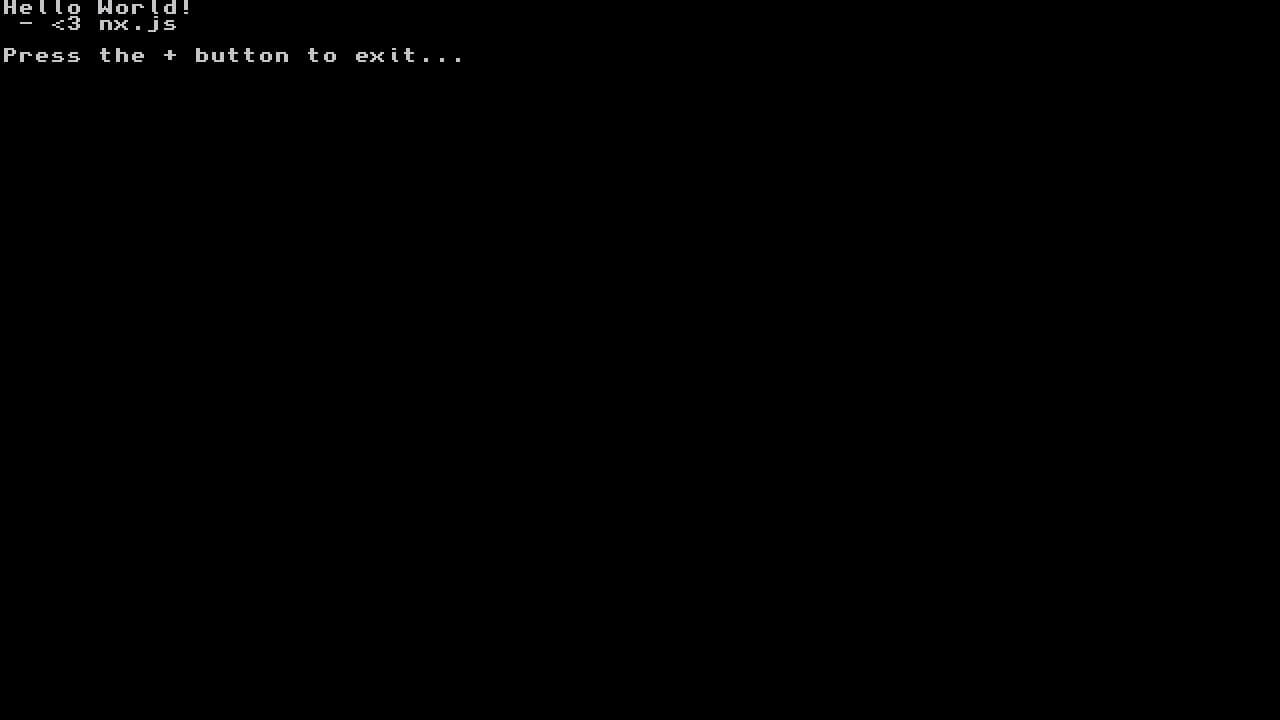

ANSI Escape Codes
The canvas terminal honors the full xterm ANSI palette (the 16 base colors plus
truecolor 38;2;…/48;2;… sequences), so colored output and cursor movement
work as you would expect from a real terminal.
Listed below is a (non-exhaustive) list of npm modules known to work well with nx.js when using console rendering mode:
kleur- Output colored text with ANSI escape codessisteransi- ANSI escape sequences for moving the cursor
Scrollback
Output that scrolls off the top of the screen is retained in a scrollback
buffer. Use console.scrollUp() and
console.scrollDown() to navigate it
(you can also drag with the touchscreen):
console.scrollUp(5);   // scroll up 5 rows into the scrollback
console.scrollDown(5); // scroll back down
Theming
The console is fully themeable. The recommended way is declaratively, via the
[console] section of nxjs.ini — the runtime
reads it at startup and styles the global console for you, with no app code:
[console]
font_size    = 22
cursor_style = bar              ; block | underline | bar

background   = #002b36
foreground   = #839496
cursor       = #93a1a1

; The full 16-color ANSI palette (black..bright_white) is supported
black        = #073642
red          = #dc322f
green        = #859900
yellow       = #b58900
blue         = #268bd2
magenta      = #d33682
cyan         = #2aa198
white        = #eee8d5
See the apps/console-theme
example for a complete Solarized Dark theme configured this way.
Programmatic theming
You can also configure the console at runtime by assigning
console.options (this overrides any
nxjs.ini styling):
console.options = {
  fontSize: 24,
  cursorStyle: 'bar', // 'block' | 'underline' | 'bar'
  theme: {
    background: '#002b36',
    foreground: '#839496',
    // ...the full `black`..`brightWhite` ANSI palette is supported
  },
};

console.log('Now with a Solarized Dark theme!');
Important
The terminal is created lazily, on the first log. Assign console.options
before your first console.* call so the options take effect on the
initial render. Re-assigning options rebuilds the terminal (and resets the
scrollback buffer).
Available options (from TerminalOptions):
| Option | Description |
|---|---|
theme | Terminal colors (background, foreground, cursor, and the black..brightWhite ANSI palette) |
fontSize | Font size in pixels |
lineHeight | Line height multiplier |
scrollback | Number of scrollback rows to retain |
cursorStyle | 'block', 'underline', or 'bar' |
cursorOpacity | Cursor opacity (0–1) |
Compositing the console canvas
The console renders to an offscreen canvas, accessible via
console.canvas. This lets a
canvas-rendering app composite the console output
into its own scene — for example, an in-game debug overlay:
const ctx = screen.getContext('2d');

function update() {
  requestAnimationFrame(update);
  // ...draw your scene...

  // Composite the live console output in the top-left corner
  ctx.drawImage(console.canvas, 0, 0);
}
update();
The console keeps updating its canvas as long as you read console.canvas, even
after an app has taken over the screen with screen.getContext('2d').
Isolated Console instances
In addition to the global console, you can create isolated
Console instances. Each renders to its own
canvas (it does not auto-present to the screen), which is useful for
multiple independent terminal surfaces:
const term = new Console({ fontSize: 18, scrollback: 500 });
term.log('Output for this terminal only');
ctx.drawImage(term.canvas, 100, 100);
Fallback behavior
When no font or display is available (for example, when the canvas terminal
can't be allocated in the memory-constrained applet regime), the console
gracefully falls back to the native libnx terminal so output is never lost.
The underlying error and stack are also written to
sdmc:/switch/nxjs-debug.log.